Boardeaze:Billboard Management Platform
Connecting Billboard Assets, Campaign Schedules and Advertiser Workflows
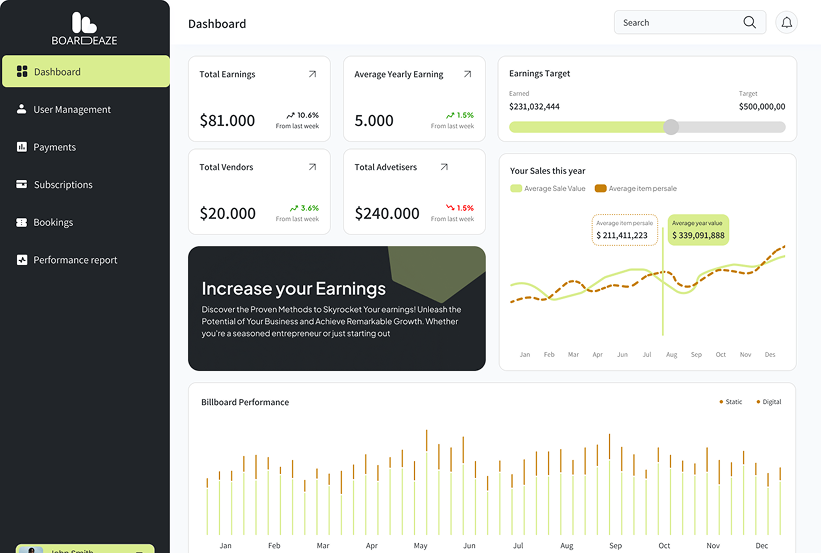

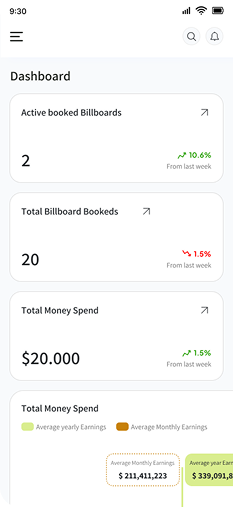

Connected Billboard Operations
From Scattered Bookings to One Operational Workflow
Disconnected Inventory & Booking Records
Connected Billboard Operations

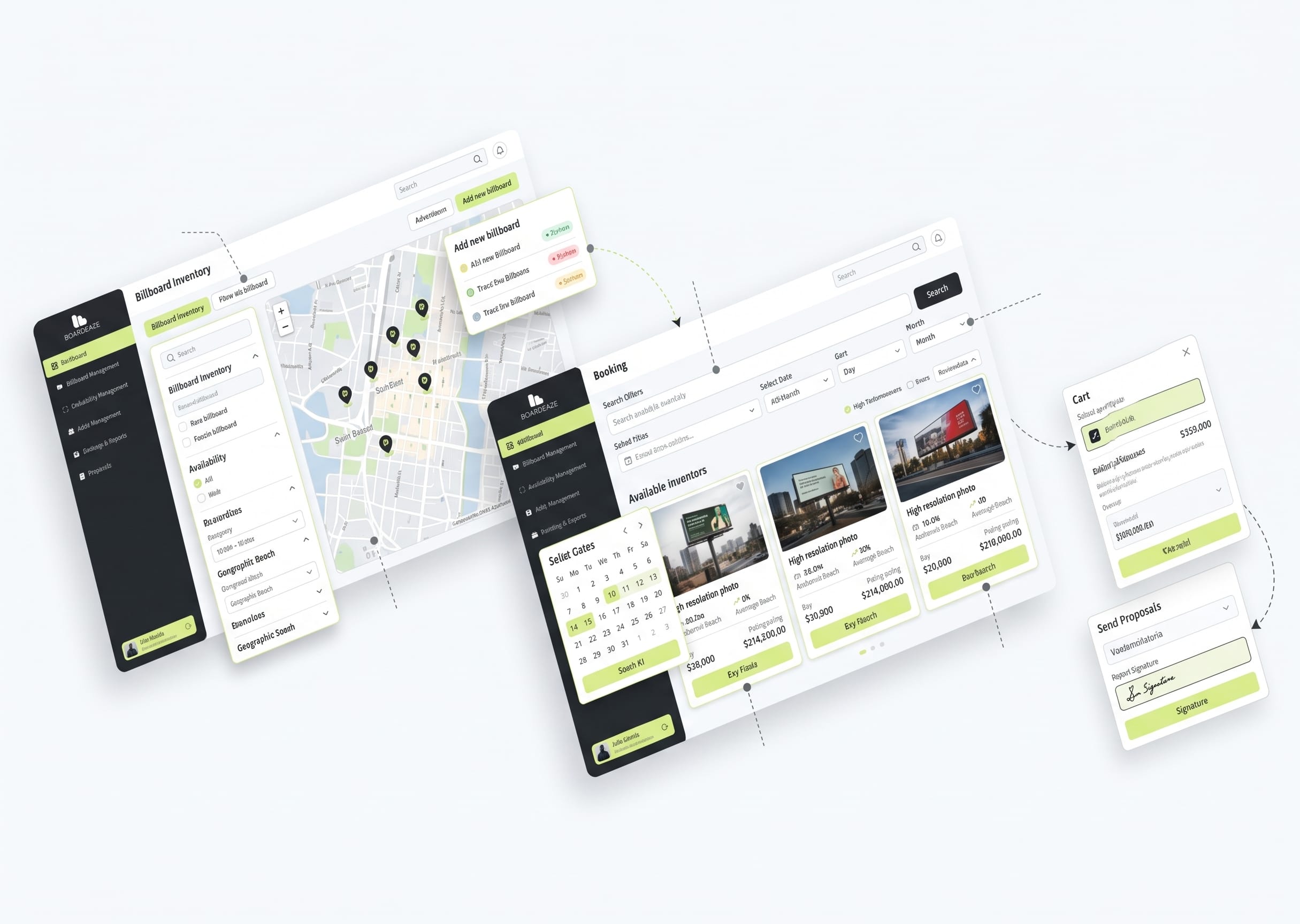
Centralized Billboard Inventory
Organize advertising sites, billboard details and vendor relationships in a shared inventory record.

Date-Based Placement Bookings
Connect each reservation to a specific asset and date range, with checks for overlapping allocations.

Campaign & Advertiser Records
Keep client information, campaign details and booked placements connected throughout the workflow.

Clear Availability & Status
Let teams review current booking information before proposing or confirming a placement.
Built Around OOH Operating Requirements
Engineering Challenges Behind Boardeaze

Overlapping Placement Requests
Requests for the same billboard can share dates, requiring checks before a placement is allocated.

Scattered Asset Information
Locations, billboard details and vendor relationships needed a consistent record for campaign coordination.

Connected Campaign Details
Advertisers, placements and campaign dates needed to remain linked as bookings moved through their operating stages.

A Growing Inventory Network
Adding sites, vendors and campaigns increases the relationships the application must keep organized and understandable.

Consistent Booking Status
Booking changes needed to be reflected wherever staff reviewed the associated asset and campaign.
Market Insights for OOH Operations
“Availability Comes Before Allocation”
A placement decision depends on the right billboard being available for the requested campaign dates.

“CRM Needs Inventory Context”
Advertiser records become more useful when they connect directly to sites, bookings and campaign schedules.

“Campaign Status Supports Coordination”
Teams need a clear operational record of what is proposed, booked, running or complete.

“Shared Records Reduce Handoffs”
Keeping asset, booking and campaign information together makes it easier to coordinate the next action.


OOH Operations Solutions Overview
-
Billboard Inventory Management Organize billboard assets, locations and vendor relationships in one shared inventory.
-
Placement Booking & Scheduling Manage billboard reservations by asset and date while checking for overlapping allocations.
-
Campaign Management Keep campaign details, booked placements and advertiser information connected.
-
Advertising CRM Connect advertiser records with campaigns, assets and booking information.
-
Availability & Booking Status Review asset availability and current booking status before confirming placements.

Boardeaze System Architecture
Billboard Inventory

Manage billboard assets, locations and vendor relationships in a centralized inventory.
Booking & Scheduling

Connect reservations to billboard assets and campaign date ranges with allocation checks.
Campaign & CRM Records

Link advertisers, campaign details and booked placements throughout the workflow.
Application APIs

Connect dashboard actions with inventory, booking and campaign modules.
Operations Dashboard

Give teams a central view of assets, availability and campaign information.
Engineering Approach

Model Assets as Bookable Inventory
Structure billboard assets, locations and vendor relationships as records that can be assigned to campaigns.
Validate Placement Dates
Apply booking checks to help identify overlapping allocations before placements are confirmed.

Validate Placement Dates
Apply booking checks to help identify overlapping allocations before placements are confirmed.

Connect Operational Records
Link advertisers, campaigns, bookings and billboard assets throughout the workflow.

Design for Operator Decisions
Present availability, booking status and campaign information where teams need it for daily coordination.
Operations & Workflow System

Review the Asset & Dates
LAYER // 01Check the billboard record and requested campaign dates before allocating a placement.

Coordinate the Booking
LAYER // 02Connect the selected asset with the placement dates and booking information.

Maintain Campaign Visibility
LAYER // 03Keep campaign, advertiser and booking status information connected as placements progress.

Project Outcomes

Shared Inventory View
Billboard assets, locations and related information are organized in one operational view.

Structured Booking Decisions
Placement requests can be reviewed against billboard availability and requested dates.

Connected Campaign Information
Advertiser, campaign, booking and asset records remain connected throughout the workflow.

Clearer Status Visibility
Teams can review booking and campaign status from a centralized operational workflow.

Modular Operating Foundation
The platform provides a structured foundation for inventory, scheduling and advertising CRM workflows.
What This Project Demonstrates

Billboard Inventory
View billboard assets, locations and availability in one centralized inventory.

Placement Bookings
Manage billboard reservations by asset and campaign date range.

Campaign Management
Connect advertiser details, campaigns and booked billboard placements.

Operations Dashboard
Review assets, bookings and campaign information from a shared operational view.
Build a Similar Solution
Macromodule can build software around billboard inventory, placement booking and advertising operations.

Billboard Inventory Platforms
Software for organizing billboard assets, locations and vendor relationships.

Placement Booking Software
Booking systems that connect billboard assets with placement dates and availability.
Advertising CRM Applications
CRM platforms connecting advertisers, campaigns, placements and operational records.

OOH Operations Dashboards
Dashboards that bring inventory, booking and campaign information into one operational view.

Frequently Asked Questions
Build Software Around Your Advertising Operations
Bring inventory, booking and campaign coordination into an application designed for your team. Tell us how your operations work today and what the next platform needs to support.
Discuss Your Project
